LLM Model Formats, Conversion and Quantization
15. Dec. 2025
I have been running and experimenting with different types of AI models including stable diffusion (SD) and large language models (LLMs). Due to my limited compute capabilities (with a total of 96 GB of GPU memory), I cannot run all available models natively. Especially the latest LLMs (as of December 2025) are too large for my hardware. As a result, different quantized versions had to be run. Because the landscape of available model formats and quantization options has grown significantly, in this post I summarize what I have learned (maybe it is of use to someone).
Model File Formats
Five model-storage formats I most have commonly encountered are:
bin: Old-School Catch-Allpt: PyTorch’s Native Formatsafetensors: Secure, Fast, and Framework-Agnosticggml: Lightweight CPU-Friendly Format (legacylama.cppformat)gguf: The Modern llama.cpp Format (successor toggml)
In this section, I summarize the background of these formats.
bin: Old-School Catch-All
Although bin is not technically a format, it still is a type of representing a model and is typical in early releases of older transformer models. Due to its generic format, framework such as PyTorch or TensorFlow (depending on the origin) could store their model weights as a bin.
After all, the bin extension simply means "binary file", and historically it was used as a generic container for model weights.
Although this format is still common and widely supported since it is easy to save and load model weights, it requires a significant amount of memory to store. Also, it has no built-in safety guarantees, no standard structure (meaning two bin files might be totally different inside)
Therefore it is mostly used for legacy models or quick manual checkpoints. Modern workflows prefer more structured formats.
pt: PyTorch’s Native Format
pt is typical in the PyTorch training pipelines, and is the official PyTorch model save format, used for storing:
- model weights,
- optimizer states, and
- full training checkpoints.
It uses Python's pickle under the hood, and sometimes files are also stored as pth. Therefore, this format is an official format, fully compatible with PyTorch, and represents the full training state (if saved that way). However, because it uses pickle, it also allows arbitrary code execution, which means it is not safe to load from untrusted sources. Similar to bin, pt can be large and slow to load.
Therefore, pt is mostly used for training models, building research prototypes, or sharing checkpoints across PyTorch teams.
safetensors: Secure, Fast, and Framework-Agnostic
The safetensors format was generated by the team of Hugging Face and became a format typically used by diffusion models, LLMs, any model shared publicly. Unlike pt the safetensors format is supported by a wider variety of frameworks such as PyTorch, TensorFlow, JAX, etc.
Therefore, one can say that safetensors is a modern alternative to pt, and is designed around two goals:
- Safety (no pickle, no executable content, 100% safe to load from untrusted sources)
- Speed (zero-copy memory mapping, faster loading than
pt)
However, the safetensors format is a slightly more rigid format compared, meaning it is not as effortless to be used for exotic checkpoint structures.
Therefore, it is mostly used when downloading models from the internet, distributing models safely, or running large models with high performance.
ggml: Lightweight CPU-Friendly Format
The ggml format was generated by Georgi Gerganov (for llama.cpp) and is optimized for CPU and small-device inference. It supports quantized models (4-bit, 5-bit, 8-bit), meaning the file sizes can be reduced. Its abbreviation hence stands for Georgi Gerganov Machine Learning.
I would say that ggml was the breakthrough format since it allowed LLaMA-style models to run locally on laptops and even phones. Nowadays, LLMs are often quantized to dramatically reduce size and memory usage.
However, the ggml format is becoming outdated and is not standardized. Although it can be loaded faster than bin, pt or safetensors, it still loads slower than successor designs (such as gguf).
Therefore, ggml is mostly used for older llama.cpp versions or legacy models.
gguf: The Modern llama.cpp Format
By the maintainers of llama.cpp, gguf stands for GPT-Generated Unified Format (sometimes explained as GGML Unified Format). It is optimized for speed, metadata, quantization, and portability.
As a result gguf is the new recommended format for the llama.cpp ecosystem. It fixes many limitations of ggml and adds rich metadata, improved loading speed, and broad tooling support.
However, even gguf has its drawbacks. For example, it is not readable by older frameworks and requires model conversion from original weights.
Nonetheless, gguf has become widely accepted as the new standard and allows running of quantized LLMs on home PCs (including a Raspberry Pi) and is compatible with local inference engines (e.g., Ollama, llama.cpp, LM Studio, KoboldCpp, etc.).
Honorable Mentions
Although I haven't used them, there are also other formats that may be worth mentioning.
ONNX (.onnx)
This is a cross-framework portable format supported by PyTorch, TensorFlow, C++, JavaScript, etc. It is popular for production deployments and optimizing models for inference (e.g., ONNX Runtime).
H5 (.h5 / .hdf5)
This is the legacy Keras/TensorFlow format. It is declining in popularity but still found in older projects.
.ckpt
This is a generic checkpoint file used across frameworks, but is not standardized. It is common in older Stable Diffusion models, but they also adapted safetensors for its benefits.
Summary of Model Formats
Each of these file formats reflects a moment in the evolution of machine-learning practice:
- When training-heavy research use
pt - When sharing model publicly use
safetensors - When wanting an efficient local inference use
ggmlor (preferably)gguf
Quantization
Both ggml and gguf support quantization of models. Quantization converts the data types of how the model weights are stored into less precise data types to reduce the memory requirements when storing the model. It is therefore a tradeoff between model speed, size, and accuracy.
Whilst full-sized models typically use floating point representations (i.e. F16 for 16-bit floating point values or F32 for 32-bit floating point values), quantization reduces the precision by using smaller sized representations. The suffixes on model files (Q4_K_M, Q6_K, or Q8_0) are an indication of how demanding or performant the model is.
The suffix can be split into four parts:
- Improved:
Iis prefixed to indicate an integer or improved quantizer. - The quantization level:
Qfollowed by a digit (e.g.Q4,Q6,Q8etc.) that indicates the number of bits in each quantized weight memory storage. - The quantization format:
Kindicates grouped quantization with (uses per-group scale and zero point),0indicates ungrouped (older style quantization), or1indicates another legacy quantization format. - The quantization precision:
Sfor small precision (fastest, lower accuracy),Mfor medium precision, orLfor large precision (slowest, higher accuracy).
This means, the example of Q4_K_M means it is a Quantized model with 4 bis per weight of a Medium-precision/quality variant of the K scheme.
The quantization process does not simply convert floating point values into integer representations (here a value of 0.327 would be rounded to 0) since model weights are typically close to zero and do not make use of the full range of integers (e.g., 0 to 255 of an unsigned 8 bit integer). Therefore, a scale \(d\) and zero point offset \(m\) are used to best use the range of the data type used by the quantization:
\[ w = d \cdot q + m\]
When restoring the weight \(w\) from the quantized value \(q\), the result is close to the original value, but not exactly the original value. For most applications this quantization loss is however acceptable.
Model Perplexity
It is possible to measure how much quantization degrades model accuracy, and the metric doing this is called perplexity. Perplexity measures how well a language model predicts text. A lower perplexity indicates less "confusion" of the model, and the closer it behaves to the original version without quantization. When comparing quantization schemes, what matters most is the relative perplexity i.e., the perplexity of the quantized model compared to its full-precision FP16 or FP32 counterpart. When running ./llama-quantize --help in the llama.cpp project, a table is provided listing all supported quantization variants along with their perplexity scores (the numbers are based on the Vicuna-13B model):
Allowed quantization types:
   2  or  Q4_0    :  4.34G, +0.4685 ppl @ Llama-3-8B
   3  or  Q4_1    :  4.78G, +0.4511 ppl @ Llama-3-8B
  38  or  MXFP4_MOE :  MXFP4 MoE
   8  or  Q5_0    :  5.21G, +0.1316 ppl @ Llama-3-8B
   9  or  Q5_1    :  5.65G, +0.1062 ppl @ Llama-3-8B
  19  or  IQ2_XXS :  2.06 bpw quantization
  20  or  IQ2_XS  :  2.31 bpw quantization
  28  or  IQ2_S   :  2.5  bpw quantization
  29  or  IQ2_M   :  2.7  bpw quantization
  24  or  IQ1_S   :  1.56 bpw quantization
  31  or  IQ1_M   :  1.75 bpw quantization
  36  or  TQ1_0   :  1.69 bpw ternarization
  37  or  TQ2_0   :  2.06 bpw ternarization
  10  or  Q2_K    :  2.96G, +3.5199 ppl @ Llama-3-8B
  21  or  Q2_K_S  :  2.96G, +3.1836 ppl @ Llama-3-8B
  23  or  IQ3_XXS :  3.06 bpw quantization
  26  or  IQ3_S   :  3.44 bpw quantization
  27  or  IQ3_M   :  3.66 bpw quantization mix
  12  or  Q3_K    : alias for Q3_K_M
  22  or  IQ3_XS  :  3.3 bpw quantization
  11  or  Q3_K_S  :  3.41G, +1.6321 ppl @ Llama-3-8B
  12  or  Q3_K_M  :  3.74G, +0.6569 ppl @ Llama-3-8B
  13  or  Q3_K_L  :  4.03G, +0.5562 ppl @ Llama-3-8B
  25  or  IQ4_NL  :  4.50 bpw non-linear quantization
  30  or  IQ4_XS  :  4.25 bpw non-linear quantization
  15  or  Q4_K    : alias for Q4_K_M
  14  or  Q4_K_S  :  4.37G, +0.2689 ppl @ Llama-3-8B
  15  or  Q4_K_M  :  4.58G, +0.1754 ppl @ Llama-3-8B
  17  or  Q5_K    : alias for Q5_K_M
  16  or  Q5_K_S  :  5.21G, +0.1049 ppl @ Llama-3-8B
  17  or  Q5_K_M  :  5.33G, +0.0569 ppl @ Llama-3-8B
  18  or  Q6_K    :  6.14G, +0.0217 ppl @ Llama-3-8B
   7  or  Q8_0    :  7.96G, +0.0026 ppl @ Llama-3-8B
   1  or  F16     : 14.00G, +0.0020 ppl @ Mistral-7B
  32  or  BF16    : 14.00G, -0.0050 ppl @ Mistral-7B
   0  or  F32     : 26.00G              @ 7B
As discussed here on Github, perplexity changes based on the size of the model or choice of quantization:
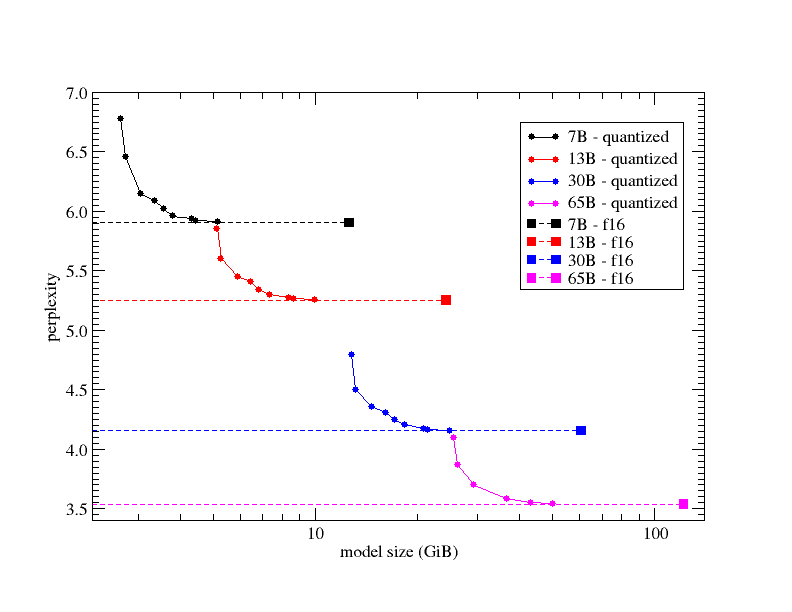
Note that the x-axis (model size in GiB) is logarithmic. The various circles on the graph show the perplexity of different quantization mixes and the solid squares represent the original FP16 model (i.e., for each line Q2_K → Q3_K → Q4_K → Q5_K → Q6_K → Q7_K → FP16 was used). The different colors indicate the LLaMA variant used (7B in black, 13B in red, 30B in blue, 65B in magenta). The dashed lines are added for convenience to allow for a better judgement of how closely the quantized models approach the FP16 perplexity. As can be seen from this graph, generation performance as measured by perplexity is basically a fairly smooth function of quantized model size, and the quantization types allow the user to pick the best performing quantized model, given the limits of their compute resources (in terms of being able to fully load the model into memory, but also in terms of inference speed, which tends to depend on the model size).
Perhaps worth noting is that the 6-bit quantized (Q6_K) perplexity is within 0.1% or better from the original FP16 model.
Converting Models
Sometimes, models are made available on Hugging Face in a raw format that is too large for local execution. Therefore, it becomes necessary to convert the model from one format into another format. The conversion process involves:
- obtaining the original weights,
- load them into Python, and
- export them using a converter script.
Here, llama.cpp has become my tool of choice, and in the following section, I explain how to convert models using llama.cpp.
Obtaining a Model
Typically, a Hugging Face model folder looks something like this:
model/
  config.json
  tokenizer.json / tokenizer.model / vocab files
  model-00001-of-00004.safetensors
  model-00002-of-00004.safetensors
  model-00003-of-00004.safetensors
  model-00004-of-00004.safetensors
Manually
The easiest way is to download the model via a browser by going to https://huggingface.co/models, selecting the wanted model, clicking on files and versions, and downloading each file of the model manually. For larger models, this can be quite painful.
Git LFS
Alternatively, Git LFS (Large File System) can be used. Therefore, LFS needs to be installed:
git lfs installAnd then, the model repository can be cloned:
git clone https://huggingface.co/<user>/<model-name>This downloads all files of the model automatically.
Hugging Face CLI
When needing to log in in order to download a model, the Hugging Face CLI may be used to download the model repository automatically. It can be installed like so:
pip install huggingface_hubThen, you need to log in using:
huggingface-cli loginAnd finally the repository can be downloaded like so:
huggingface-cli download <user>/<model-name> --local-dir ./modelConversion
Using the downloaded repository
First, the converter (e.g., llama.cpp) needs to be obtained. For gguf, the most used toolchain is llama.cpp, which can be downloaded and set up like so:
git clone https://github.com/ggml-org/llama.cpp
cd llama.cpp

# if you want to use the Python converter
pip install -r requirements.txt

# if you want to quantize and/or run models
cmake -B build
cmake --build build --config Release
The conversion script can be run like so:
python3 convert_hf_to_gguf.py \
  /path/to/model \
  --outfile /path/to/output/model.gguf \
  --vocab-type auto
Herein, the /path/to/model is the folder that contains:
config.json- tokenizer files
- multiple
safetensorsfiles
The script then automatically loads the config, reads all safetensor shards and merges them, and writes a floating-point gguf file.
At this point a "base" gguf file has been created (often f16), which may (depending on the model) be of huge size.
To get smaller files (e.g. Q4_K_M, Q5_0 etc.), one needs to quantize:
./llama-quantize \
  /path/to/output/model.gguf \
  /path/to/output/model-Q4_K_M.gguf \
  Q4_K_M
Docker
Alternatively, you can pull the official Docker image, which removes the need to install dependencies manually:
docker pull ghcr.io/ggml-org/llama.cpp:fullYou can start a docker container and then use the same commands as above.
docker run --rm -it \
  -v $HOME/llama-models:/models \
  --entrypoint /bin/bash \
  ghcr.io/ggml-org/llama.cpp:full
Alternatively, you can run just the conversion / quantization commands using docker:
docker run --rm -it \
  -v $HOME/llama-models:/models \
  ghcr.io/ggml-org/llama.cpp:full \
  --convert /models \
  --outfile OUTFILE \
  --outtype OUTTYPE
Here the parameter /models is the directory containing the model file (it may be replaced by a huggingface repository ID if the model is not yet downloaded). The OUTFILE parameter (optional) is the path the converted / quantized mode will be written to (default is based on the input directory). The OUTTYPE parameter (optional) indicates the output format of the model and may be:
f32forfloat32,f16forfloat16,bf16forbfloat16,q8_0forQ8_0,tq1_0ortq2_0for ternary, andautofor the highest-fidelity 16-bit float type depending on the first loaded tensor type.
More information regarding the llama.cpp and its docker image may be found here.