Model View Controller (MVC) for MATLAB GUIs
28. Aug. 2016
The other day I attended a MATLAB training course to make pretty GUIs. It was very interesting, yet the way MathWorks recommended to share data between multiple windows was slightly off-putting for me. In short, they showed all attendees two ways to exchange data. Either have a main windows that holds all data, or the data is stored alongside all windows' handles (handles are used in MATLAB to access properties of displayed objects). The former works well if there is always an main window open, and I don't see any inherent problem here. Nonetheless, the latter approach requires duplicate data to be stored, which seems very wasteful, unstable, and difficult to expand. My solution: the Model View Controller (MVC - link). Next I will show you the differences and how the MVC can be programmed.
GUI
Let's start by making a Graphical User Interface (GUI). The quickest way to do this is with MATLAB's guide tool. Simply enter guide into the command window and replicate the following interface:

This window consist of a "Static Text" containing the string "Change Value", a "Slider", and another "Static Text" containing the string "n/a". The slider and bottom static text are tagged as (so they become identifiable) as follows:
- Slider: slider
- Text: value
That's pretty much it for the time being.
Data Handling
Now let me quickly address the data handling. Here, the idea is that the GUI can be instantiated several times and does not hold any data at all. In fact, the GUI simply displays what it told to display, and when the user interacts with the GUI, it notifies something (i.e. its controller) that a changed occurred. It is then the controller's job to evaluate the user's input and update the GUI(s) correct. I tried to capture this interaction in the following sketch:
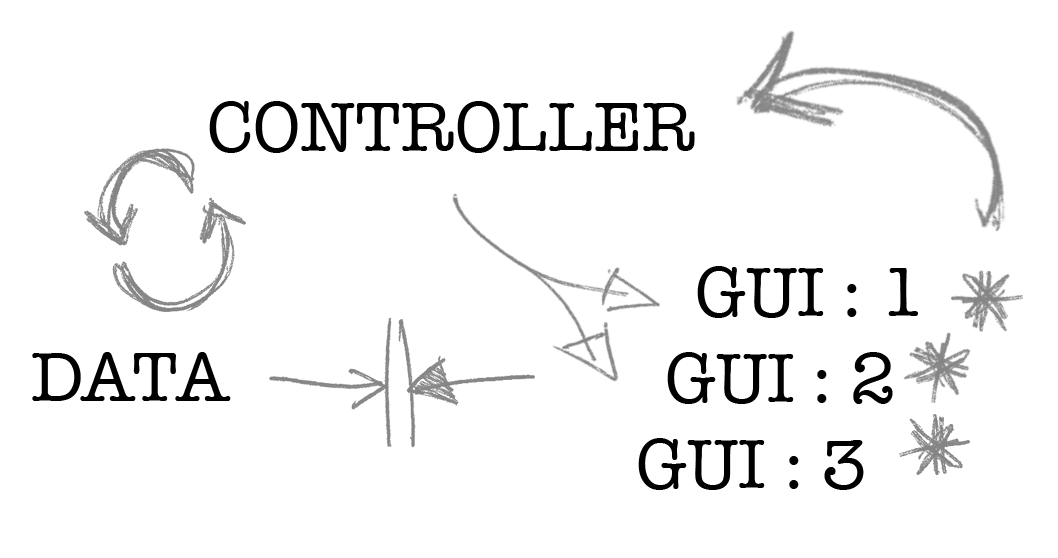
Here, the controller forwards data to the guis 1, 2 & 3, which is then displayed. If the user interacts with any of the guis (asterisk), then they notify the controller of that change it updates the guis correspondingly. Additionally, and to complete the MVC, I have added a data container, which may be a database, website or whatever you want it to be. The idea is, that only the controller can interact with the data to avoid making the guis wait, freeze and ruining the user experience.
Additionally, if the user decides to close a window whilst data is being processed, the controller will notice this and not crash the app by trying to assign a nonexistent variable. Clever, right?
Controller Code
Now you know the in-and-outs of the guide it is time to write up the controller class (yes, I love classes in MATLAB).
The class itself will contain the following functionality:
- Open a set of windows with sliders (the figure we made in
guide) - Close all windows at once (i.e. when you want to close the app)
- Update all windows with each other's slider values
So let's define the bare-bone of the class:
classdef Controller
    properties
        % Store the handle to all windows
        windows
    end

    methods

        function self = Controller(num_windows)
            % Contains the constructor code and opens num_windows windows
        end

        function close_all(self)
            % Closes all windows that are stored in self.windows
        end

        function update(self)
            % Obtains the data from all windows and updates them
        end

    end
end
Now let's write the constructor method:
function self = Controller(num_windows)

    if num_windows > 5 || num_windows < 0
        warndlg('The maximum number of windows to open is 5');
        return
    end

    % Initialise the
    self.windows = nan(num_windows, 1);

    % First create all windows
    for i = 1:num_windows
        % Open a new window and assign it
        self.windows(i) = slider_window();
    end

    % Then assign data (otherwise some may have false copies or so)
    for i = 1:num_windows
        % Get the handles for sliders and value labels
        all_data = guidata(self.windows(i));
        % Update the figure title to something meaningful
        all_data.figure.Name = sprintf('Figure [val %d]', i);
        % Add a delegate function to notify of an update
        all_data.delegate = @self.update;
        guidata(self.windows(i), all_data);
    end

end
The closing function is quite straight forward, too. But since some windows might have been closed we need to include some try-catch statements to prevent the code attempting to access nonexistent figure properties.
function close_all(self)
    % Closes all windows that are held by the controller
    for i = 1:length(self.windows)
        % Try to close the figure if it exists
        try
            close(self.windows(i));
        catch
            disp(['Cannot close figure ', num2str(i)]);
        end
    end
end
And finally, the heart of the class; the update method. As already stated, this method will obtain the slider values from all figures and list them in each figure's "value" text field.
function update(self)
    % The update data on all windows

    % Get data from each window and populate the data string
    data_string = [];
    for i = 1:length(self.windows)
        % Try and retrieve the data from the slider in the figure
        try
            all_data = guidata(self.windows(i));
            data_string = [data_string, ...
                'val ', num2str(i), ': ', num2str(all_data.slider.Value), char(10)];
        catch
            disp(['Figure ', num2str(i), ' does no longer exist']);
            data_string = [data_string, ...
                'val ', num2str(i), ': n/a', char(10)];
        end
    end

    % Set data for each window
    for i = 1:length(self.windows)
        % Try and set the value string in the figure
        try
            all_data = guidata(self.windows(i));
            all_data.value.String = data_string;
        catch
            disp(['Cannot update figure ', num2str(i)]);
        end
    end
end
Final Step
Now to bring it all together, let's write a simple script that initializes a Controller object.
clear
close all
clc

% Create however many windows you want
c = Controller(5);
% Update the windows, i.e. set them to defaults
c.update();

% Wait for an input in the terminal to trigger closing
pause

% Close all windows
c.close_all();
After wiggling all sliders on all figures, this is what you should see:

And when changing any of the figures' sliders, the values on all the others update, too. Cool, right? But what if the user decided to close one of the figures? The result would look like this:

When changing any of the sliders, the value from (here) figure 4 could no longer be obtained, hence the controller substitutes n/a and outputs a friendly reminder to the terminal:
Figure 4 does no longer exist
Cannot update figure 4
Also, when continuing the execution of main.m by pressing any key to continue, the still remaining figures are all closed and another friendly warning is prompted:
Cannot close figure 4So, how cool and handy are MVCs? Very! At least that's what I think... If you want to have a copy of this code, you can download a zip from here. Enjoy!